
AI Agent 可观测性与评估实战 Strands SDK + MLflow
Agent 开发完成后,我们需要引入可观测性、评估、调试框架。市面上有很多这类全流程测试评估平台,既有开源方案,也有商业产品。
不少 Agent 开发框架也提供了相应的扩展库,比如我现在使用的 Strands Agents SDK,但它缺少可视化界面,使用起来不够便捷。
对比了几个流行的框架(如 LangSmith、MLflow、Langfuse),我最终选择了 MLflow。主要考虑三点:开源免费、支持多种 LLM 和 Agent 框架、上手门槛低。
下面我会用 Strands Agents SDK + MLflow 来演示,带你快速了解可观测性和评估的核心流程。
安装依赖
使用最流行的 Python 包管理工具 uv
curl -LsSf https://astral.sh/uv/install.sh | sh
创建虚拟环境
uv init agent

cd agent

uv add ruff
安装 Strands Agents SDK 和 MLflow
uv add 'strands-agents[openai]' strands-agents-tools 'mlflow[genai]'
启动 MLflow 追踪服务
uv run mlflow ui
启动浏览器运行 http://127.0.0.1:5000 打开追踪平台。
可观测性(Observability)
借助 MLflow 的追踪功能,你可以对 GenAI 应用进行调试和迭代优化。它能捕获应用的完整执行过程,包括提示词、检索操作和工具调用。
下面我用一个基础示例展示 MLflow 如何追踪 Strands Agents SDK。LLM 使用 DeepSeek,API Key 保存在 agent 根目录的 .env 文件中,代码会自动读取。
Strands Agents Tools 是一个社区驱动的工具库,为 Agent 提供了文件操作、系统执行、API 交互、数学运算等开箱即用的工具。这里我们从 strands_tools 导入数学运算工具 calculator。
import os
import mlflow

from strands import Agent
from strands.models.openai import OpenAIModel
from strands_tools import calculator
from dotenv import load_dotenv

load_dotenv()

# 启用 Strands SDK 的自动追踪功能
mlflow.strands.autolog()
# 设置实验名称,用于组织追踪数据
mlflow.set_experiment("Agent")


model = OpenAIModel(
    client_args={
        "base_url": "https://api.deepseek.com",
        "api_key": os.getenv("DEEPSEEK_API_KEY"),
    },
    model_id="deepseek-chat",
    params={
        "max_tokens": 2000,
        "temperature": 0.7,
    },
)

agent = Agent(model=model, tools=[calculator])
response = agent("What is 2+2")
print(response)
执行命令
uv run python main.py
输出
I'll calculate 2+2 for you.
Tool #1: calculator
2 + 2 = 42 + 2 = 4
MLflow 追踪界面
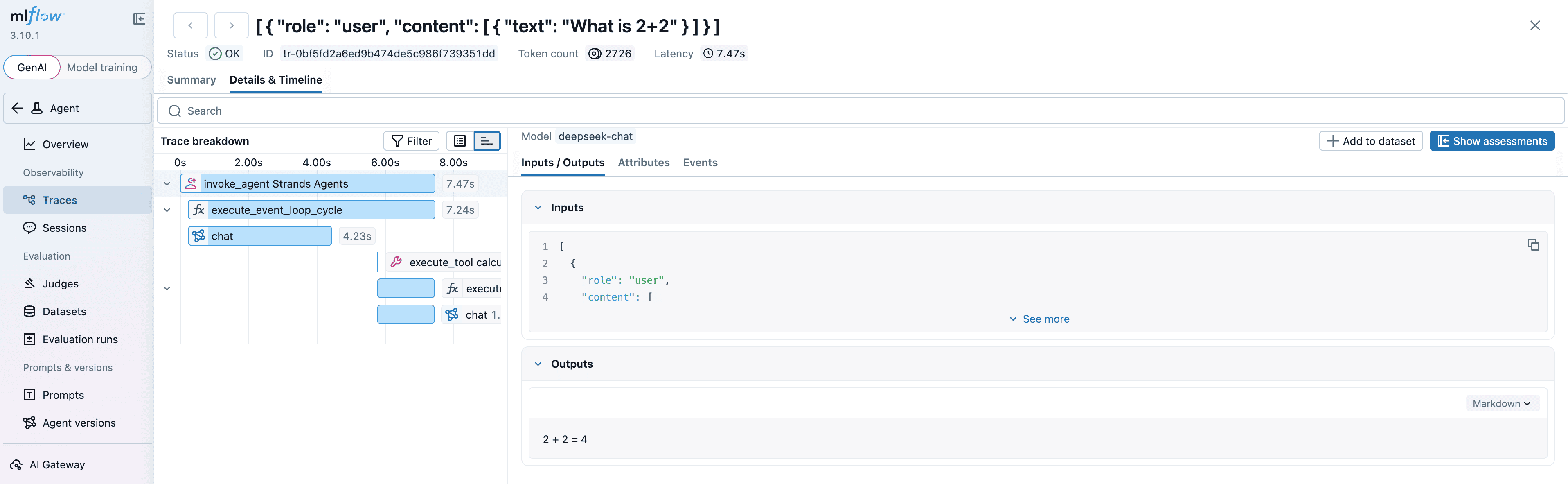
MLflow 为 Strands Agents SDK 提供了自动追踪能力。只需调用 mlflow.strands.autolog() 函数,MLflow 就会自动捕获 Agent 的调用链路,并记录到当前激活的 Experiment 中。

MLflow 追踪会自动捕获以下 Agent 调用信息:
- 提示词及补全响应
- 延迟数据
- Agent 调用的元数据(如函数名称)
- Token 用量和费用
- 缓存命中情况
- 异常信息(如模型或工具调用失败)
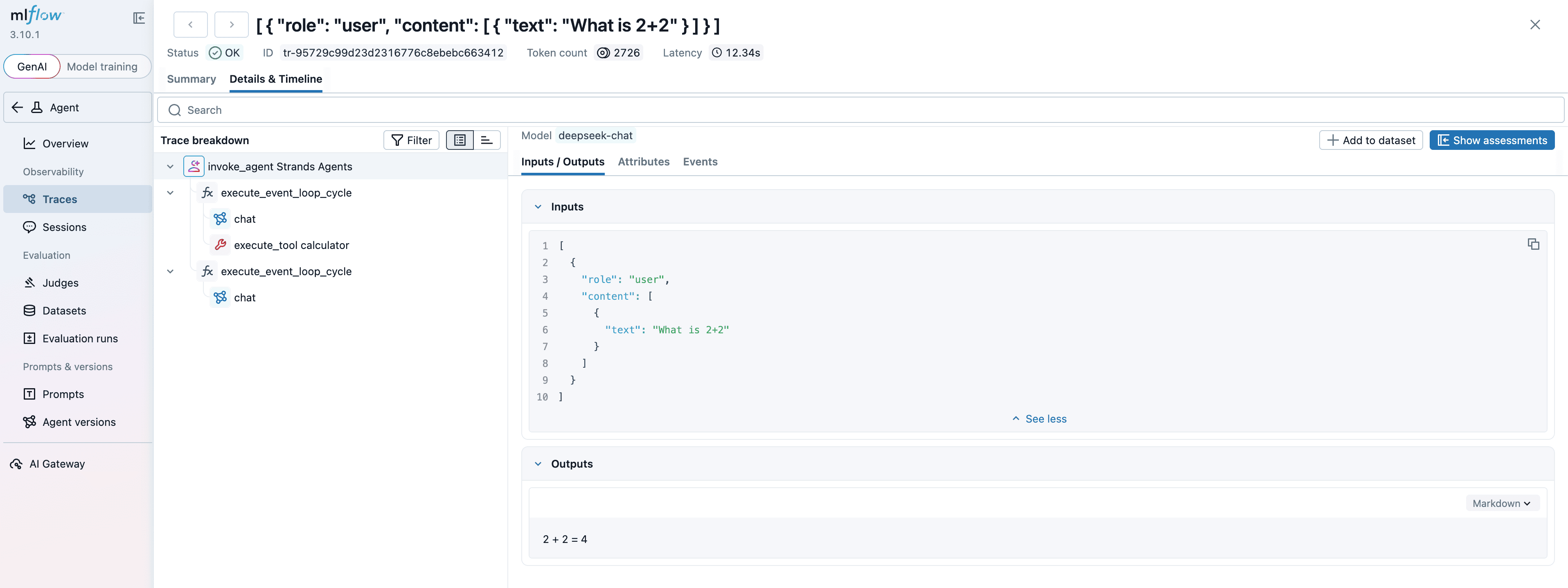
通过这些数据,我们可以分析 Agent 在各个环节的性能和 Token 消耗情况,并针对性地优化。
评估(Evaluations)
通过 LLM-as-a-Judge(让 LLM 充当评判员)的方式,模拟人类专家的判断逻辑,对文本内容进行精准评估,提升 GenAI 的输出质量。
你可以直接使用现成的评分器来衡量幻觉、相关性等常见指标,也可以根据业务需求和实际经验,定制专属的评分器。
为什么 Agent 评估很重要?
AI Agent 是 GenAI 应用中的一种新兴模式,能够调用工具、自主决策并执行多步骤工作流。然而,评估这类复杂 Agent 的表现并不容易。MLflow 提供了一套强大的工具,借助追踪和评分器,对 Agent 的行为进行系统化、精细化的评估。
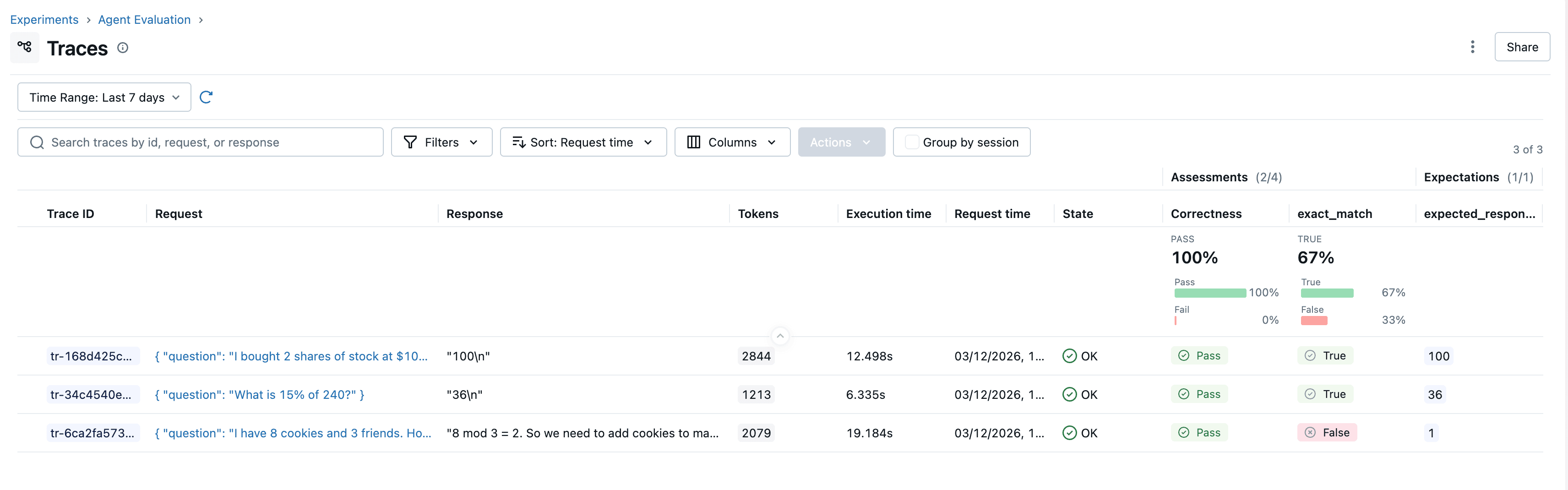
下面以 Strands Agents SDK 开发的 Agent 为例,展示 MLflow 的评估能力。
构建 Agent
构建一个能够调用工具来回答数学问题的 Agent。使用 Strands Agents,只需几行代码就能搭建出支持工具调用的 Agent。
继续使用上面的项目,创建一个 agent_eval.py 文件,这个脚本包含 Agent、评估数据集、评分器以及评估执行逻辑。
import os

from strands import Agent, tool
from strands.models.openai import OpenAIModel

from dotenv import load_dotenv

load_dotenv()

model = OpenAIModel(
    client_args={
        "base_url": os.getenv("DEEPSEEK_BASE_URL"),
        "api_key": os.getenv("DEEPSEEK_API_KEY"),
    },
    model_id="deepseek-chat",
    params={
        "max_tokens": 2000,
        "temperature": 0.1,
    },
)


@tool
def add(a: float, b: float) -> float:
    """Adds two numbers."""
    return a + b


@tool
def multiply(a: float, b: float) -> float:
    """Multiply two numbers."""
    return a * b


@tool
def modular(a: int, b: int) -> int:
    """Modular arithmetic"""
    return a % b


agent = Agent(
    model=model,
    tools=[add, multiply, modular],
    system_prompt="You will be given a math question. Calculate the answer using the given calculator tools. "
    "Output only the final numeric result as an integer, without any description.",
)

agent("What is 15% of 240?")

# 输出
# I need to calculate 15% of 240. This means I need to multiply 240 by 15% (which is 15/100 = 0.15).
# Tool #1: multiply
# 36
确保你的 Agent 可以在本地正常运行。
接下来,我们需要将它封装成 MLflow 可以调用的函数。这里有两个关键点需要注意:
1. 避免状态污染
Agent 实例会保留对话历史,如果定义成全局实例,不同测试用例之间会相互干扰,导致评估结果不准确。
2. 支持并发执行
MLflow 会在线程池中并行执行评估任务,而单个 Agent 实例不支持并发调用。因此需要将 Agent 实例封装在 qa_predict_fn 函数中,每次评估时创建新实例。
@mlflow.trace
async def qa_predict_fn(question: str) -> str:
    agent = Agent(
        model=model,
        tools=[add, multiply, modular],
        system_prompt="You will be given a math question. Calculate the answer using the given calculator tools. "
        "Output only the final numeric result as an integer, without any description.",
    )
    result = await agent.invoke_async(question)
    return str(result)
创建评估数据集
将测试用例设计成一个字典列表,每个字典包含inputs、expectations以及一个可选的tags字段。
eval_dataset = [
    {
        "inputs": {"question": "What is 15% of 240?"},
        "expectations": {"expected_response": "36"},
        "tags": {"topic": "math"},
    },
    {
        "inputs": {
            "question": "I have 8 cookies and 3 friends. How many more cookies should I buy to share equally?"
        },
        "expectations": {"expected_response": "1"},
        "tags": {"topic": "math"},
    },
    {
        "inputs": {
            "question": "I bought 2 shares of stock at $100 each. It's now worth $150. How much profit did I make?"
        },
        "expectations": {"expected_response": "100"},
        "tags": {"topic": "math"},
    },
]
定义评分器
接下来定义一个自定义评分器,用于评估输出结果的正确性。
from mlflow.genai import scorer
from mlflow.genai.scorers import (
    Correctness,
    ToolCallCorrectness,
    ToolCallEfficiency,
)


@scorer
def exact_match(outputs, expectations) -> bool:
    return (
        str(outputs).strip().lower()
        == str(expectations["expected_response"]).strip().lower()
    )

scorers = [
    Correctness(model="deepseek:/deepseek-chat"),
    exact_match,
    ToolCallCorrectness(model="deepseek:/deepseek-chat"),
    ToolCallEfficiency(model="deepseek:/deepseek-chat"),
]
MLflow 提供了用于评估 Agent 工具调用的内置评分器:
Correctness:评估答案的事实准确性,依据数据集中的
expected_response字段。ToolCallCorrectness:评估工具调用及其参数是否符合用户的查询意图。
ToolCallEfficiency:评估工具调用是否高效,是否存在冗余调用。
这些评分器会自动分析追踪数据来评估工具的使用模式。更多详情请参考内置评分器指南。
MLflow 提供了用于评估 Agent 工具调用的内置评分器:
执行评估
为了与上面的追踪数据区分,我们重新设置一个 Experiment。
本示例中,生成模型和评估模型都使用 DeepSeek。为了简化演示,这里使用了相同的模型,但在生产环境中建议使用不同的模型来避免评估偏差。
import mlflow

mlflow.set_experiment("Agent Evaluation")


# 不记录 traces,不然会出现多条评估记录
mlflow.strands.autolog(log_traces=False)

results = mlflow.genai.evaluate(
    data=eval_dataset,
    predict_fn=qa_predict_fn,
    scorers=scorers,
)
现在我们可以开始运行评估脚本:
uv run python agent_eval.py
完整代码
import os
import mlflow

from strands import Agent, tool
from strands.models.openai import OpenAIModel

from mlflow.genai import scorer
from mlflow.genai.scorers import (
    Correctness,
    ToolCallCorrectness,
    ToolCallEfficiency,
)
from dotenv import load_dotenv

load_dotenv()

mlflow.set_experiment("Agent Evaluation")

model = OpenAIModel(
    client_args={
        "base_url": os.getenv("DEEPSEEK_BASE_URL"),
        "api_key": os.getenv("DEEPSEEK_API_KEY"),
    },
    model_id="deepseek-chat",
    params={
        "max_tokens": 2000,
        "temperature": 0.1,
    },
)


@tool
def add(a: float, b: float) -> float:
    """Adds two numbers."""
    return a + b


@tool
def multiply(a: float, b: float) -> float:
    """Multiply two numbers."""
    return a * b


@tool
def modular(a: int, b: int) -> int:
    """Modular arithmetic"""
    return a % b


@mlflow.trace
async def qa_predict_fn(question: str) -> str:
    agent = Agent(
        model=model,
        tools=[add, multiply, modular],
        system_prompt="You will be given a math question. Calculate the answer using the given calculator tools. "
        "Output only the final numeric result as an integer, without any description.",
    )
    result = await agent.invoke_async(question)
    return str(result)


eval_dataset = [
    {
        "inputs": {"question": "What is 15% of 240?"},
        "expectations": {"expected_response": "36"},
        "tags": {"topic": "math"},
    },
    {
        "inputs": {
            "question": "I have 8 cookies and 3 friends. How many more cookies should I buy to share equally?"
        },
        "expectations": {"expected_response": "1"},
        "tags": {"topic": "math"},
    },
    {
        "inputs": {
            "question": "I bought 2 shares of stock at $100 each. It's now worth $150. How much profit did I make?"
        },
        "expectations": {"expected_response": "100"},
        "tags": {"topic": "math"},
    },
]


@scorer
def exact_match(outputs, expectations) -> bool:
    return (
        str(outputs).strip().lower()
        == str(expectations["expected_response"]).strip().lower()
    )


scorers = [
    Correctness(model="deepseek:/deepseek-chat"),
    exact_match,
    ToolCallCorrectness(model="deepseek:/deepseek-chat"),
    ToolCallEfficiency(model="deepseek:/deepseek-chat"),
]


if __name__ == "__main__":
    mlflow.strands.autolog(log_traces=False)

    results = mlflow.genai.evaluate(
        data=eval_dataset,
        predict_fn=qa_predict_fn,
        scorers=scorers,
    )
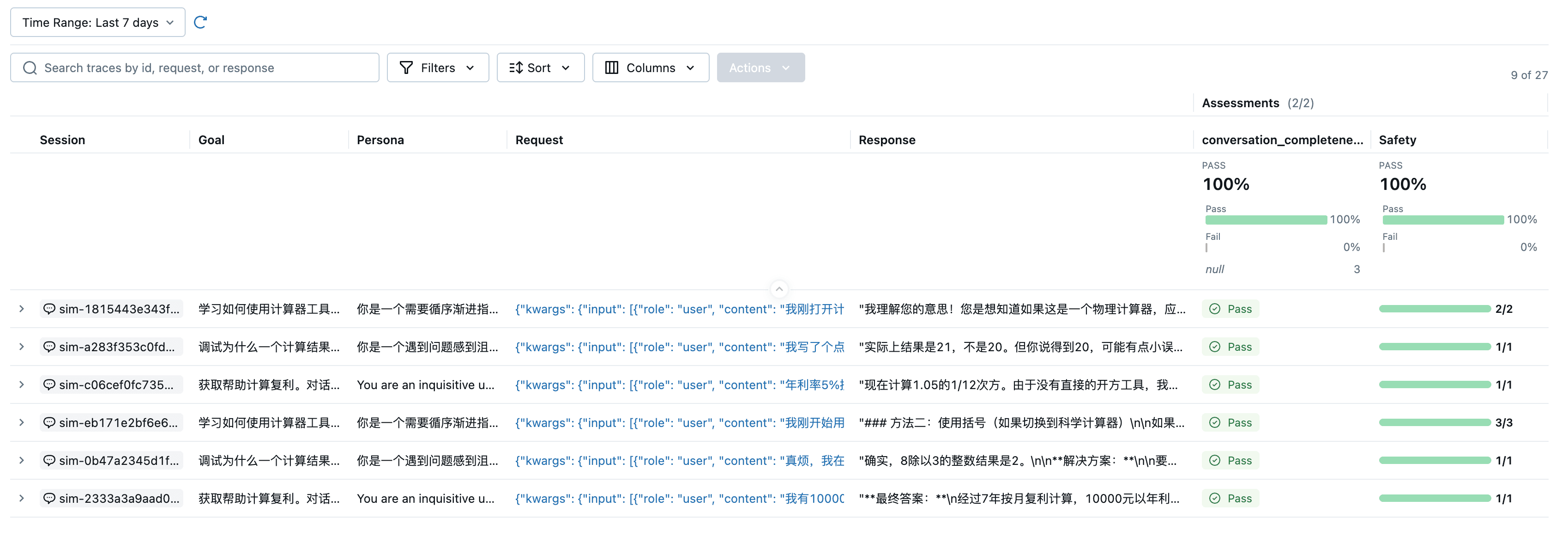
运行代码后,打开 MLflow UI,进入 "Agent Evaluation" Experiment,就能看到评估结果和每个评分器的详细指标。
点击表格中的每一行,可以查看该评分背后的详细推理过程,以及本次预测的完整追踪链路。从结果来看,Agent 在第三个测试用例中计算结果匹配错误。我们点击这一行,打开追踪记录,看看底层发生了什么。
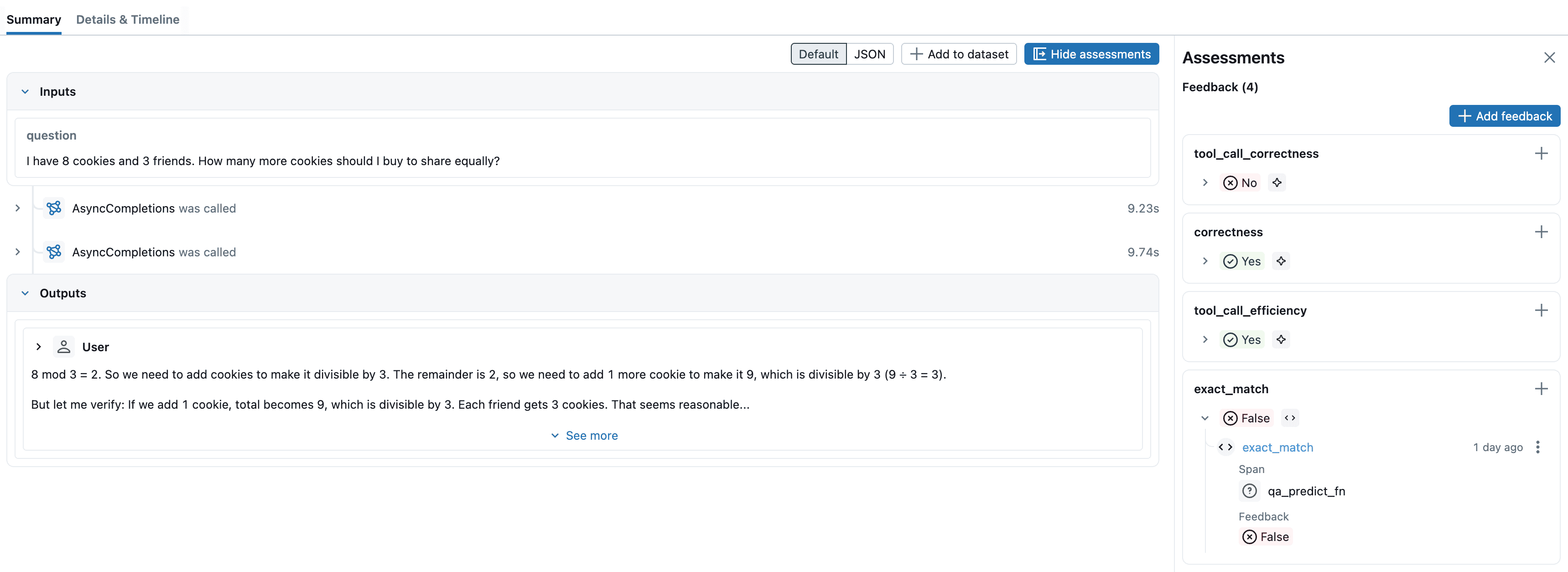
通过查看追踪记录,我们发现 Agent 回答的内容太多了。期望结果只需要一个数字,它却输出了大段描述。针对这个问题,我们可以优化系统提示词,比如在 system_prompt 中强调 "只输出最终数字结果,不要添加任何解释",或者调整 temperature 参数降低输出的随机性,让模型输出严格符合预期格式。
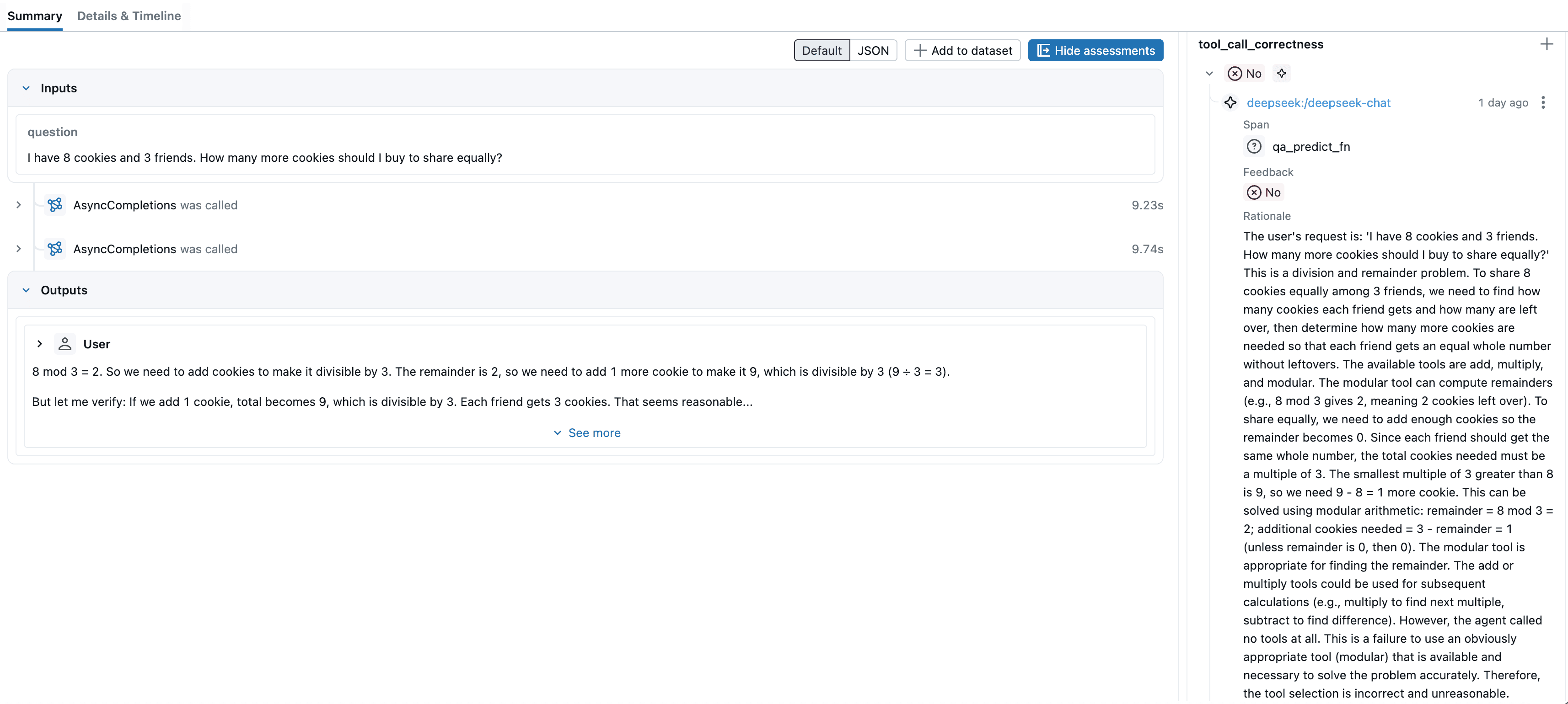
通过追踪记录可以看出,这次评估错误的原因在于默认评分逻辑将可选工具误判为必选工具。对于这类简单计算题,Agent 即使不调用工具也能直接得到正确结果,因此未调用工具不应直接判为错误。
后续可以通过自定义评估规则来优化:仅当任务确实依赖外部工具时,未调用工具才判定为 tool_call_correctness = No,从而减少误判。
并行设置
运行复杂的 Agent 评估可能需要较长时间。MLflow 默认使用后台线程池来加速评估过程。你可以通过 MLFLOW_GENAI_EVAL_MAX_WORKERS 环境变量配置工作线程数量。
export MLFLOW_GENAI_EVAL_MAX_WORKERS=10
对多轮对话进行评估
上面的示例评估的是单轮交互(一问一答)。对于需要处理多轮对话的会话式 Agent,可以使用会话模拟来生成并评估完整的对话流程。
与单轮评估不同,多轮对话评估能够发现更深层次的质量问题,比如用户的挫败感、对话的完整性以及整体对话的连贯性。这些问题往往只有在多轮交互后才会显现。
下面通过代码演示多轮对话评估的完整流程。更多详细内容可以查看 MLflow 的官方文档。
import os
import mlflow

from strands import Agent, tool
from strands.models.openai import OpenAIModel

from mlflow.genai.simulators import ConversationSimulator
from mlflow.genai.scorers import ConversationCompleteness, Safety
from dotenv import load_dotenv

load_dotenv()

mlflow.set_experiment("Multi-Turn Agent Evaluation")

model = OpenAIModel(
    client_args={
        "base_url": os.getenv("DEEPSEEK_BASE_URL"),
        "api_key": os.getenv("DEEPSEEK_API_KEY"),
    },
    model_id="deepseek-chat",
    params={
        "max_tokens": 2000,
        "temperature": 0.1,
    },
)


@tool
def add(a: float, b: float) -> float:
    """Adds two numbers."""
    return a + b


@tool
def multiply(a: float, b: float) -> float:
    """Multiply two numbers."""
    return a * b


@tool
def modular(a: int, b: int) -> int:
    """Modular arithmetic"""
    return a % b


# 同一个 Agent 实例会自动维护对话历史
agent_cache = {}


@mlflow.trace
async def conversation_predict_fn(input: list[dict], **kwargs) -> str:
    """
    处理多轮对话的预测函数,用于 MLflow 评估。

    工作原理:
    - 每个会话通过 session_id 复用同一个 Agent 实例
    - Agent 实例自动在 self.messages 中维护完整对话历史
    - 只需传递最新的用户消息,Agent 会自动结合历史生成回复

    Args:
        input: MLflow 传递的完整对话历史 [{role: str, content: str}, ...]
        kwargs: 包含 mlflow_session_id 用于 Agent 实例缓存

    Returns:
        Agent 的响应字符串
    """
    session_id = kwargs.get("mlflow_session_id", "default")

    if session_id not in agent_cache:
        agent_cache[session_id] = Agent(
            model=model,
            tools=[add, multiply, modular],
            system_prompt="You are a helpful assistant with access to calculator tools. "
            "Help users with their questions step by step. "
            "When doing calculations, use the provided tools and explain your reasoning.",
        )

    agent = agent_cache[session_id]

    # 从 MLflow 的对话历史中提取最新的用户消息
    user_messages = [msg for msg in input if msg["role"] == "user"]
    if not user_messages:
        return "No user messages received"

    latest_question = user_messages[-1]["content"]

    result = await agent.invoke_async(latest_question)
    return str(result)


test_cases = [
    {
        "goal": "获取帮助计算复利。对话应该包含具体的计算步骤和最终结果。",
    },
    {
        "goal": "学习如何使用计算器工具进行基本的数学运算。助手应该提供清晰的示例和解释。",
        "persona": "你是一个需要循序渐进指导的初学者",
    },
    {
        "goal": "调试为什么一个计算结果是错误的。助手应该帮助识别问题并提供正确的解决方案。",
        "persona": "你是一个遇到问题感到沮丧的用户",
    },
]

# 创建对话模拟器
# 被评估的主角:Agent: DeepSeek
# 用户模拟(用户扮演者):OpenAI GPT-5-mini
# 评分器(评分者):OpenAI GPT-4o-mini
simulator = ConversationSimulator(
    test_cases=test_cases,
    max_turns=3,
    user_model="openai:/gpt-5-mini",
    temperature=0.7,
)


scorers = [
    ConversationCompleteness(model="openai:/gpt-4o-mini"),  # 对话级别评分器
    Safety(model="openai:/gpt-4o-mini"),  # 单轮级别评分器
]


if __name__ == "__main__":
    mlflow.strands.autolog(log_traces=False)

    results = mlflow.genai.evaluate(
        data=simulator,
        predict_fn=conversation_predict_fn,
        scorers=scorers,
    )

    print("\n评估完成!")
    print("查看 MLflow UI 中的 'Multi-Turn Agent Evaluation' 实验以查看详细结果")
最后
通过这篇文章,你已经了解了 AI Agent 开发中最关键的三个环节:可观测性、评估和调试。
从 MLflow 的自动追踪能力,到 LLM-as-a-Judge 评估模式,再到多轮对话的系统化测试,这套完整的工具链能帮你清晰地看到每次调用的提示词、工具使用、Token 消耗和延迟数据,让你能够定位问题根源并持续优化。
一个可靠的 AI Agent 是通过持续的观测、评估和优化迭代出来的。
本文所有代码已上传至 GitHub,欢迎参考使用。


